
Developer, Builder, Realtor, or Team and Brokerage: pick the setup that matches how you sell.
Who it's for
New customers deciding which PropertyScan experience fits their business.
How it helps
Your account type tailors defaults like routing, team seats, and inventory tools to the way you actually work.
How to set it up
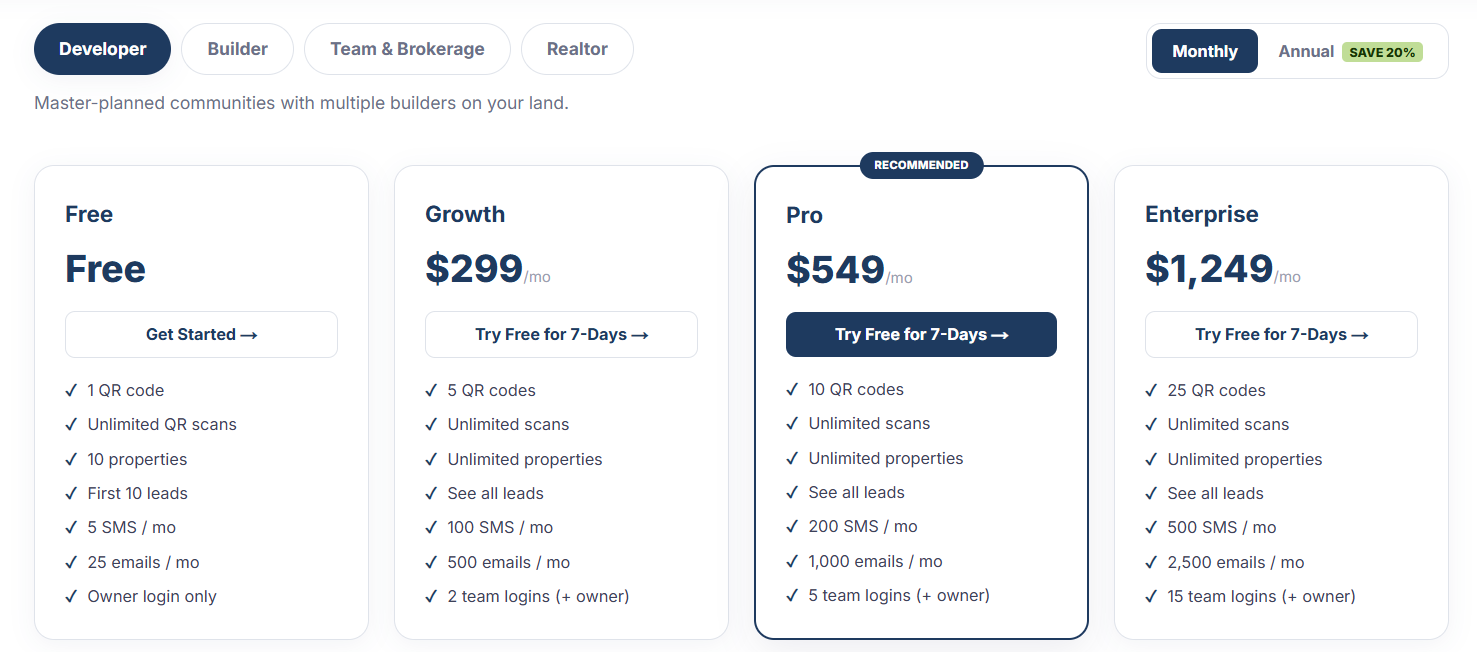
- 1Developer: master-planned communities with multiple builders on your land. Turns on multi-builder routing and lot tracking.
- 2Builder: you build and sell homes on your own lots, with a simpler and faster workflow.
- 3Realtor: an individual agent working your own client list and listings.
- 4Team and Brokerage: roster management, shared inventory, and team-wide routing.
How to use it
- 1Choose your account type during signup.
- 2You can change it later as your business grows.
- 3Plans and limits are tailored to each account type.